
Volumizer+3.7 - Google Play
You'll be able to see results in few seconds.
Publisher Description
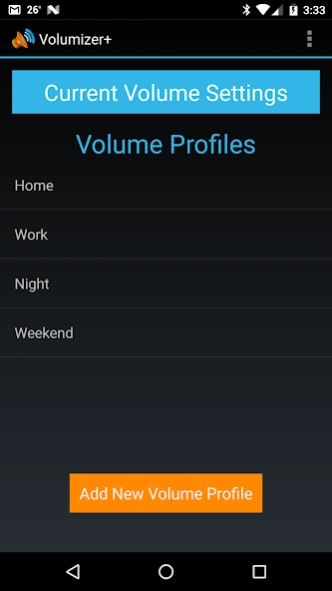
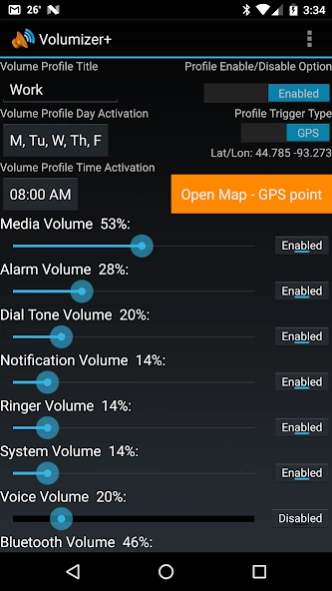
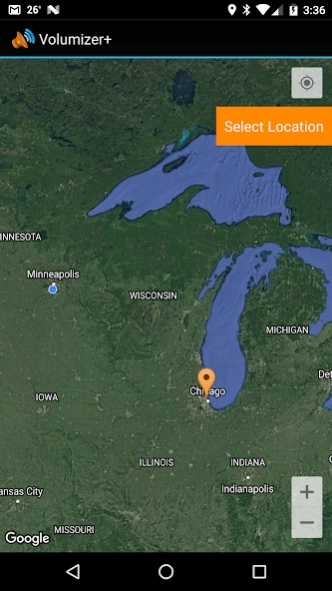
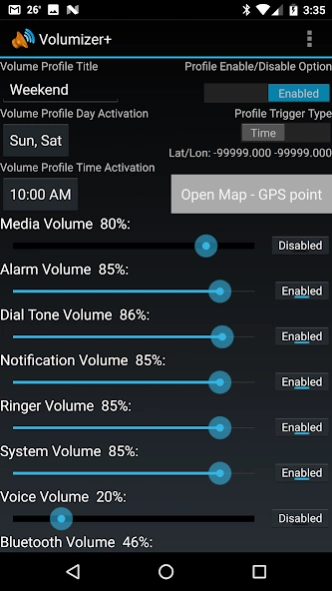
Volumizer+...never set volume again, now GPS & time based volume settings!
Volumizer+...you will never have to set your volume again! Automatic volume control for people who don't want to constantly set their volume levels. *** Now with GPS location option! ***
Does your phone ringer go off loudly at work and annoy the whole office? Do you ever have your ringer volume set low at the office that when you get home you can't even hear it? Have you ever had your phone ring so loud while sleeping it causes you to jump out of bed? Using Volumizer+ will automatically set your volume levels so none of these situations will ever happen to you again.
This app allows the user to create many volume profiles which will automatically activate based on a trigger time or GPS location. You can set up a profile for any activity in life...set it to ring loud at home, quiet at work, silent at night (while sleeping) and you can even set it to be as loud as possible if you plan on being out at the bars on Friday and Saturday nights.
Simply create a new profile (using the menu button) then set the time and days you wish to trigger or use a GPS location your volume profile. Next, you can tap the edit the volume settings for that profile. If you wish to delete the profile or edit the trigger timing for that volume profile just press and hold the volume profile until the options for edit or delete appear.
That's it, your volume profiles will automatically activate at the trigger time and days selected or when approaching GPS location.
Some hardware devices have volume settings directly connected to other volume settings. To check to see if your volume settings are connected to one another just adjust your current volume and see if changing one setting will cause another one to change as well. Keep this association in mind when setting your volume profiles.
Automatic volume management, volume manager, volume control, sound control, sound manager, audio control, audio manager, audio mixer and audio volume sliders.
About Volumizer+
The company that develops Volumizer+ is Mithrandir48. The latest version released by its developer is 3.7.
To install Volumizer+ on your Android device, just click the green Continue To App button above to start the installation process. The app is listed on our website since 2017-04-20 and was downloaded 0 times. We have already checked if the download link is safe, however for your own protection we recommend that you scan the downloaded app with your antivirus. Your antivirus may detect the Volumizer+ as malware as malware if the download link to com.mithrandir1.audio is broken.
How to install Volumizer+ on your Android device:
- Click on the Continue To App button on our website. This will redirect you to Google Play.
- Once the Volumizer+ is shown in the Google Play listing of your Android device, you can start its download and installation. Tap on the Install button located below the search bar and to the right of the app icon.
- A pop-up window with the permissions required by Volumizer+ will be shown. Click on Accept to continue the process.
- Volumizer+ will be downloaded onto your device, displaying a progress. Once the download completes, the installation will start and you'll get a notification after the installation is finished.
Program Details
System requirements
Download information
Pricing
Version History
version 3.7
posted on 2017-04-21
version 2.3
posted on 2013-06-13
Several fixes and updates
version 2.3
posted on 2013-06-13
Added better functionality and new Holo theme for android 4.0+ software versions. Now there is a new Enable/Disable selection for each volume profile (so they can be saved and activated when desired); plus all the volume settings are accessible from a single screen!,Just added new coloring scheme for older versions of Android software (2.3 or earlier).,Added some new functionality for daylight savings time.
Disclaimer
Official Google Play Link
We do not host Volumizer+ on our servers. We did not scan it for viruses, adware, spyware or other type of malware. This app is hosted by Google and passed their terms and conditions to be listed there. We recommend caution when installing it.
The Google Play link for Volumizer+ is provided to you by apps112.com without any warranties, representations or guarantees of any kind, so access it at your own risk.
If you have questions regarding this particular app contact the publisher directly. For questions about the functionalities of apps112.com contact us.
